Disney Ring Icon Theme1.0
Publisher Description
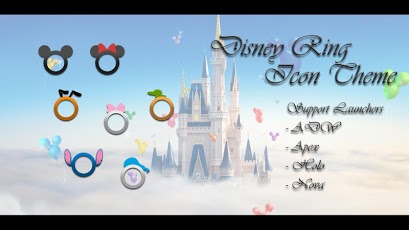
»Multiple famous Disney cartoon characters - Mickey mouse, Minnie mouse, Donald duck, Daisy duck, Goofy, Pluto dog and Stitch!»These 7 character rings will randomly mask on all icons!BEFORE USE===========»The app will not open/ be visible in your app drawer after download»This theme is ONLY for supported launchers, you MUST have one of below launchers installed.Support Launchers: ADW, Apex, Holo or Nova.(Search and download for FREE in Play Store if you don't have one yet)HOW TO USE==============♥ADW.Launcher (/EX)Home screen->Menu->ADW settings->Themes♥Apex Launcher (/Pro)Home screen->Menu->Theme settings♥Holo Launcher (/HD)Home screen->Menu->Launcher Settings->Appearance Settings->Icon pack♥Nova Launcher (/Prime)Home screen->Menu->Nova Settings->Look and feel->Icon Theme»If you like this theme, please rate in Play Store!»No root and No permission required»ATTENTION to GO Launcher users: This theme is NOT compatible with GO Launcher Ex because inverted mask issue.»This icon theme app is created by a Disney fan, and for entertainment purpose only.Webpage: http://wolsrm.blogspot.com/Email: wolsrm@gmail.comTwitter@wolsrmGoogle Plus: https://plus.google.com/u/0/102520581206783475390/Tags:screen, style, skin, button, live wallpaper, walt disneyland
About Disney Ring Icon Theme
The company that develops Disney Ring Icon Theme is Mr. Slow. The latest version released by its developer is 1.0. This app was rated by 1 users of our site and has an average rating of 3.0.
To install Disney Ring Icon Theme on your Android device, just click the green Continue To App button above to start the installation process. The app is listed on our website since 2013-04-19 and was downloaded 124 times. We have already checked if the download link is safe, however for your own protection we recommend that you scan the downloaded app with your antivirus. Your antivirus may detect the Disney Ring Icon Theme as malware as malware if the download link to disney.icontheme.slowproduction is broken.
How to install Disney Ring Icon Theme on your Android device:
- Click on the Continue To App button on our website. This will redirect you to Google Play.
- Once the Disney Ring Icon Theme is shown in the Google Play listing of your Android device, you can start its download and installation. Tap on the Install button located below the search bar and to the right of the app icon.
- A pop-up window with the permissions required by Disney Ring Icon Theme will be shown. Click on Accept to continue the process.
- Disney Ring Icon Theme will be downloaded onto your device, displaying a progress. Once the download completes, the installation will start and you'll get a notification after the installation is finished.
Program Details
System requirements
Download information
Pricing
Version History
version 1.0
posted on 2013-04-19
Several fixes and updates
